[WIZE] Two releases that remove the copy and paste tax
You’re reading AI for Fundraisers, our weekly note where we share practical AI tips for fundraising teams plus WIZE product updates. If you want to choose what you get from us, you can manage your preferences here.
Before we get into it, quick reminder:
Last week we shipped two updates that both aim at the same problem:
Fundraising work is already a lot. The hidden time cost is all the switching.
And AI makes it even worse.
Find the data in your CRM. Copy it into a doc. Draft something. Paste it into another doc. Realize you need to tweak a paragraph. Send it to someone for feedback. Apply edits. Repeat.
So here are the releases.
1) Salesforce integration
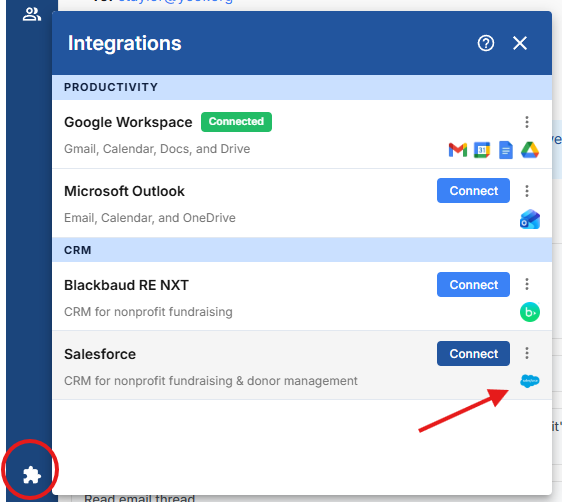
Generic AI can help you write faster. That is not the hard part.
The hard part is knowing what to write, for which donor, and why now.
Connecting Salesforce gets WIZE closer to your real context, so it can help answer the questions you actually have mid week.
Try asking:
“Based on our Salesforce data, which donors look like upgrades right now?”
“List our LYBUNT donors over $500 and draft a simple re engagement email for that group.”
“Pull the notes from the last touchpoint for these 10 donors and draft individualized follow ups.”
2) WIZE can now live edit your docs
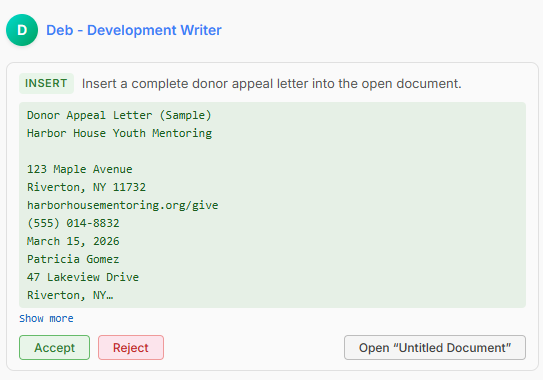
This one is simple. No more copy and paste.
Open a document in WIZE. Then ask WIZE to change it.
Try:
“Rewrite the opening paragraph to be more direct and shorter.”
“Add a section called ‘Who this is for’ and make it two bullets.”
“Make this email sound more like a real MGO wrote it. Less polished. More practical.”
“Turn this into a one page board update. Keep the numbers. Cut the fluff.”
If you try one thing today, do this.
Open the doc you are working on right now, and ask WIZE to make one specific change to it.
If you get stuck, reply and tell me what you were trying to do. Include the doc name.
Best,
Louis