New Feature: Get instant feedback with "Ask WIZE"
Review tasks are the worst.
You know the moment. You finish a draft, look at it, and think... "Is this actually any good?" Or maybe you're staring at a blank task description, waiting for inspiration to strike while the clock ticks.
We just added a new "Easy Button" to WIZE to help with exactly that.
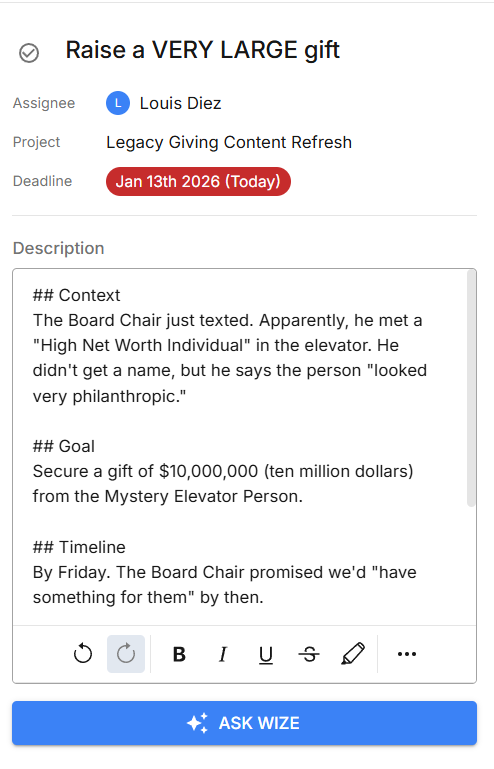
New Feature: Ask WIZE
Now, when you open any task in WIZE, you’ll see an "Ask WIZE" button. Click it, and you can instantly get help with whatever you're working on.
Need a draft started? Ask WIZE to write it.
Having doubts about your tone? Ask WIZE for feedback.
Stuck on a strategy? Ask WIZE to brainstorm next steps.
It’s like leaning over to a smart colleague and saying, "Hey, can you take a quick look at this?" except they reply instantly.
Need a Refresher?
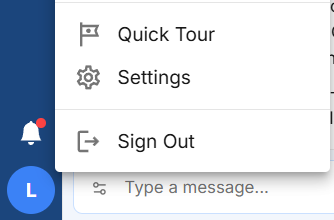
If you want to see how all the pieces fit together, we also added a new Quick Tour. Just click the circle with your initial (bottom left corner) and select "Quick Tour" for a guided walkthrough.
Coming Up: Effortless Events
Speaking of saving time... events are usually the biggest time-suck in a small shop.
On January 23, we’re hosting our next AI Practice Session: Effortless Events. We’ll show you how to use AI to handle the heavy lifting of event planning so you can focus on the people in the room.
Join us here:
AI Practice Session: Effortless Events | Donor Participation ProjectGive the new "Ask WIZE" button a try this week and let me know what you think.